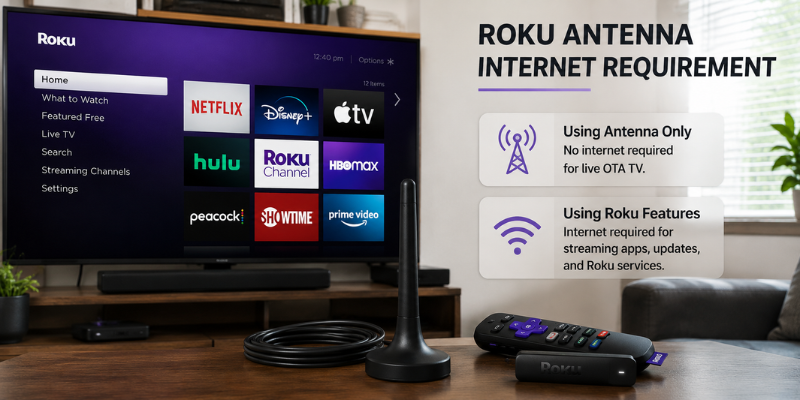

The Roku antenna internet requirement is a common question for people who want to watch local TV without relying entirely on Wi-Fi. The good news is that a traditional antenna does not need an internet connection to receive over-the-air broadcasts. However, your Roku TV still uses the internet for streaming apps, updates, and other connected features. Understanding how these two technologies work together can help you build a reliable and affordable home entertainment setup.
Understanding the Roku Antenna Internet Requirement
No. A traditional TV antenna receives broadcast signals directly from local television stations through the air. It does not depend on Wi-Fi, mobile data, or a broadband connection.
When an antenna is connected to a compatible Roku TV, the television can scan for available over-the-air channels. These may include local news, weather, sports, and major network broadcasts, depending on what stations are available in your area.
Think of an antenna as a radio receiver for television signals. The signal travels from a broadcast tower to your antenna, rather than from the internet to your TV.
This means you can potentially watch antenna channels even when your home internet service is disconnected.
How Roku and an Antenna Work Together
The important distinction is between the antenna and the Roku platform.
An antenna provides the TV signal. Roku provides a smart-TV interface and access to internet-based entertainment services. If you are using a Roku TV, both experiences can exist on the same screen, but they rely on different technologies.
For example, imagine your internet connection goes down during a storm. You may lose access to Netflix, YouTube, or other streaming apps. However, if your antenna is receiving a strong local broadcast signal, your over-the-air channels can continue working.
This is one of the biggest advantages of keeping an antenna connected to a smart TV.
What Can You Watch Without Internet?
If your Roku TV has a built-in tuner and a compatible antenna connection, you can watch available broadcast channels without maintaining an internet connection for the actual TV signal.
Depending on your location and antenna quality, you might receive:
- Local news stations
- ABC, CBS, NBC, FOX, or other network affiliates
- Weather broadcasts
- Local sports
- Public television
- Independent local stations
- Additional digital subchannels
The exact channel selection varies significantly by location.
Your home may receive dozens of channels while another household only a few miles away receives fewer. Buildings, hills, trees, antenna placement, broadcast tower distance, and antenna design can all affect reception.
When Does a Roku antenna internet requirement Need Internet?
Although an antenna does not require internet, a Roku TV becomes much more useful when it is connected to the internet.
Internet access is generally needed for activities such as:
- Streaming Netflix and similar services
- Watching YouTube
- Downloading or using streaming apps
- Receiving software and system updates
- Using internet-based Roku features
- Accessing online content and services
This is where many people get confused. They see a Roku device as an internet-connected product and assume every television function must use Wi-Fi. That isn’t the case.
A Roku TV can combine traditional broadcast television with internet streaming, giving you two different ways to watch content.
Can You Set Up a Roku TV Without Internet?
This depends on the specific Roku TV model, software version, and the feature you want to use.
For basic antenna television, the tuner and antenna connection are separate from the broadcast signal itself. However, initial setup or certain smart-TV functions may require an internet connection or additional configuration.
If your goal is simply to watch local broadcast channels, check your particular Roku TV’s setup requirements before disconnecting the internet completely.
There is another practical consideration: even if you primarily use an antenna, keeping your Roku TV connected periodically can make software updates and other maintenance easier.
How to Connect an Antenna to a Roku TV
Connecting an antenna is usually straightforward.
First, plug the antenna’s coaxial cable into the TV’s antenna or cable input. The exact label can vary by model.
Next, open the TV’s live-TV or channel setup area and select the option for an antenna or over-the-air channels. The television will then scan for available broadcasts.
For the best results, place the antenna where it has a relatively clear path toward local broadcast towers. An antenna sitting behind a large television cabinet or deep inside a basement may perform worse than one positioned near a window or higher location.
If the channel scan finds very few stations, don’t immediately assume the antenna is defective. Try repositioning it and running another scan.
Do You Need Wi-Fi for Roku Channel Guide Information?
This can vary depending on the Roku TV and its software features.
The actual broadcast signal received through the antenna carries television programming, while some additional guide information and connected features may rely on internet services.
This creates an important distinction: receiving an over-the-air channel is not the same thing as receiving every piece of information displayed around that channel.
If your internet connection disappears, the broadcast itself may remain available even though certain online features become limited.
For households trying to reduce internet usage, this is worth remembering. You can use an antenna for local broadcasts and reserve your internet connection for the streaming services you actually want.
Antenna Reception Matters More Than Internet Speed
If your main goal is free local television, upgrading your internet plan won’t necessarily improve antenna reception.
A faster broadband package cannot make a weak antenna signal stronger.
Instead, focus on factors such as antenna placement, distance from broadcast towers, surrounding structures, and the antenna’s suitability for your area.
An amplified antenna can sometimes help in difficult reception environments, but amplification is not a universal solution. If the problem is interference or poor placement, adding amplification may not solve it.
A useful approach is to test reception from different positions before buying additional equipment.
Roku Antenna vs. Streaming: Which Is Better?
The best choice often isn’t one or the other. For many households, using both makes more sense.
An antenna can provide local broadcasts without a monthly television subscription, while streaming services offer on-demand movies, shows, documentaries, and other programming.
For instance, you might use the antenna for local news and live network programming, then switch to a streaming service when you want a specific series.
This hybrid setup can also be useful during internet outages. Your streaming library may become temporarily unavailable, but local over-the-air broadcasts can still provide news and emergency information as long as the antenna signal and television power are available.
Practical Tips for Getting Better Antenna Results
A few simple changes can make a noticeable difference.
Place the antenna strategically. Higher and more open positions often produce better reception than enclosed spaces.
Run a channel scan after moving the antenna. The TV needs to rescan to identify channels that become available after repositioning.
Keep the coaxial cable in good condition. Damaged or poorly connected cables can cause signal problems.
Check local broadcast availability. Your location determines which stations are realistically receivable.
Don’t assume bigger means better. Antenna performance depends on design and environment, not simply physical size.
Use streaming and antenna TV together. This gives you more flexibility without relying entirely on broadband.
Frequently Asked Questions
Does a Roku TV work with an antenna without Wi-Fi?
Yes, compatible Roku TVs can receive over-the-air broadcasts through a connected antenna without using Wi-Fi for the broadcast signal itself. However, certain Roku features, setup processes, updates, or streaming applications may require internet access.
Can I watch local channels on Roku without internet?
If you have a compatible Roku TV and an antenna, you can receive available local over-the-air broadcasts without internet service. The channels you receive depend on your location, antenna placement, and local broadcast coverage.
Does an antenna give Roku free channels?
An antenna can provide access to free over-the-air broadcast channels. These channels are transmitted by local broadcasters and don’t require a monthly streaming subscription. Reception and channel availability vary by location.
Does Roku need Wi-Fi for Netflix and YouTube?
Yes. Internet-based services such as Netflix and YouTube require an internet connection. Your antenna can continue providing broadcast TV separately, but streaming applications depend on an active internet connection.
Will a faster internet plan improve my antenna signal?
No. Internet speed and antenna reception are separate. If your over-the-air channels are weak or missing, improving antenna placement, checking connections, or choosing an antenna suited to your area is more relevant than upgrading your broadband speed.
Conclusion
The roku antenna internet requirement is simpler than it may first appear: the antenna itself does not need internet to receive over-the-air television broadcasts. Your Roku TV can use the antenna for local channels while relying on Wi-Fi or another internet connection for streaming and connected services. For many households, combining an antenna with streaming provides an affordable and reliable entertainment setup. If you want free local television without depending entirely on broadband, an antenna can still be a remarkably useful companion to Roku.