
If you have ever looked closely at a high-resolution display and wondered how much sharper a screen could actually get, an 8K computer monitor is where things become fascinating. With a resolution of 7680 × 4320 pixels, an 8K display packs an enormous amount of detail into a single screen. That sounds impressive, but resolution alone does not tell the whole story. From creative work and professional editing to gaming and everyday productivity, an 8K monitor can be either an incredible investment or unnecessary overkill depending on how you use your computer.
What Makes an 8K Monitor Different?
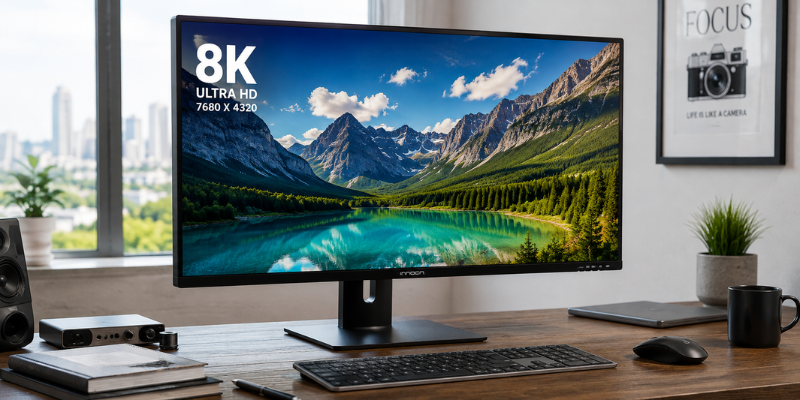
An 8K computer monitor has 7680 pixels horizontally and 4320 pixels vertically. That works out to more than 33 million pixels, roughly four times as many as a 4K display.
The difference becomes especially noticeable on larger screens or when you sit relatively close to the monitor. Fine text, photographs, architectural drawings, video footage, and other detailed content can look exceptionally crisp.
One practical advantage is screen real estate. Instead of constantly switching between windows, you can place several applications side by side while keeping text and graphics sharp. For someone working with spreadsheets, editing software, browser windows, and communication tools simultaneously, that can be genuinely useful.
However, an important point is often overlooked: you need suitable content to take advantage of all those pixels. Watching a standard HD video does not magically turn it into native 8K content.
Who Actually Needs an 8K Computer Monitor?
For the average home-office user, an 8K display is rarely essential. Email, documents, web browsing, and basic office applications can look excellent on 4K or even lower-resolution screens.
Professionals working with highly detailed visual content have a stronger reason to consider one.
An 8K monitor can make sense for:
- Professional photographers
- Video editors and filmmakers
- 3D artists and animators
- CAD and engineering professionals
- Architects and designers
- Medical and scientific imaging specialists
- Users who need enormous desktop workspace
Imagine editing a very large photograph. With a high-resolution display, you can zoom into tiny details without immediately losing clarity. Similarly, an editor working with high-resolution footage can view more of the source material while keeping editing tools visible.
For these users, the resolution is not simply a specification on a product page. It can become part of the workflow.
8K for Gaming: Amazing, but Demanding
Gaming is probably the area where an 8K computer monitor sounds most exciting—and where the practical limitations become obvious.
Rendering a game at 7680 × 4320 requires a tremendous amount of graphics processing power. Even powerful modern GPUs can struggle with demanding games at native 8K, particularly when high graphical settings and advanced effects are enabled.
There is also the question of refresh rate. A high-resolution display running at a modest refresh rate may not feel as responsive as a lower-resolution gaming monitor designed for fast gameplay.
For competitive gaming, many players will benefit more from a high-refresh-rate 1440p or 4K monitor than from moving to 8K.
For visually spectacular single-player games, however, 8K can be impressive when the hardware is capable of driving it. Upscaling technologies and intelligent rendering techniques can also reduce the workload, although the exact experience depends heavily on the game, GPU, and monitor.
The Importance of Graphics Hardware
Buying an 8K monitor without considering the rest of your computer is a common mistake.
The monitor can display the resolution, but your graphics hardware must actually produce the image. For professional applications, this may require a powerful workstation GPU. Gaming systems face an even tougher challenge because they need to render complex scenes in real time.
Before purchasing an 8K display, check:
- Your GPU’s maximum supported resolution
- Available DisplayPort or HDMI standards
- Required cable specifications
- Supported refresh rates
- Whether your software supports high-resolution workflows
- Your computer’s overall performance
It is also worth checking the exact specifications of the monitor rather than assuming that every connection supports the advertised resolution and refresh rate.
Picture Quality Goes Beyond Resolution
An 8K label does not automatically guarantee the best-looking monitor.
Panel technology, contrast, brightness, color accuracy, HDR performance, viewing angles, and calibration can have a major effect on the final image.
For example, a professional photographer may care more about accurate colors and wide color-gamut coverage than simply having more pixels. A video editor may prioritize HDR capability and consistent brightness. A gamer may care more about refresh rate, response time, adaptive synchronization, and input latency.
This is why comparing monitors solely by resolution can lead to a disappointing purchase.
A well-calibrated 4K professional display can be more useful for a photographer than an inexpensive 8K panel with weaker color performance.
Connectivity and Compatibility Matter
High-resolution displays move a huge amount of data, so connectivity deserves serious attention.
Depending on the monitor, you may encounter DisplayPort, HDMI, USB-C, or other connections. The exact capabilities vary by model and generation, so always verify what resolution and refresh rate each port can actually handle.
Cable quality matters too. A cable may physically fit into a port but still fail to provide the bandwidth required for your preferred configuration.
If you use a laptop, USB-C compatibility deserves particular attention. Some laptops can drive high-resolution external displays while others have limitations depending on their graphics hardware and port implementation.
It is also smart to consider your future setup. If you expect to add another display, docking station, or high-speed peripheral later, make sure the monitor will not become a connectivity bottleneck.
Is an 8K Monitor Worth the Money?
The answer depends almost entirely on your workload.
For ordinary browsing, office work, streaming, and casual gaming, an 8K computer monitor is difficult to justify financially. A high-quality 4K display can already provide excellent sharpness and plenty of workspace.
For professional visual work, the calculation is different. If an 8K screen helps you inspect detail, organize a complicated timeline, view large designs, or reduce the need for multiple monitors, the productivity benefits may justify the cost.
There is another consideration: future-proofing. Display technology continues to improve, and native 8K content may become more common over time. Buying early can provide access to technology that remains relevant for years, but early adopters also tend to pay more.
My practical advice is simple: buy 8K because you have a clear reason to use it, not simply because the number is bigger.
What to Check Before Buying
Before committing to an 8K computer monitor, create a short checklist based on your actual needs.
Look at the:
- Screen size and pixel density
- Panel type
- Color accuracy
- HDR support
- Brightness
- Refresh rate
- Response time
- Ports and bandwidth
- Stand and ergonomic adjustment
- Operating-system compatibility
- GPU requirements
- Warranty and support
Think about your desk as well. A very large, high-resolution monitor can transform a workspace, but it also requires enough physical room and an appropriate viewing distance.
If you spend eight or more hours a day in front of the screen, ergonomic adjustment may ultimately matter more than having the highest possible resolution.
FAQs About 8K Computer Monitors
What is an 8K computer monitor?
An 8K computer monitor typically has a resolution of 7680 × 4320 pixels, giving it more than 33 million pixels. It provides significantly greater pixel density and workspace than conventional Full HD and 4K displays.
Is 8K better than 4K for everyday computer use?
Not necessarily. An 8K monitor can provide more detail and desktop space, but most everyday tasks do not require that level of resolution. For many users, a quality 4K monitor offers a better balance of image quality, performance, compatibility, and cost.
Can a normal computer run an 8K monitor?
It depends on the computer’s graphics hardware and connection standards. The system must support the monitor’s resolution and desired refresh rate. Before buying, check your GPU specifications and the capabilities of your DisplayPort, HDMI, or USB-C connection.
Are 8K monitors good for gaming?
They can produce exceptionally detailed images, but native 8K gaming requires substantial graphics performance. Gamers who prioritize smooth frame rates and competitive responsiveness may prefer a lower-resolution monitor with a significantly higher refresh rate.
Who should buy an 8K computer monitor?
An 8K display is most compelling for professionals who work with extremely detailed visual content, including photographers, filmmakers, designers, architects, engineers, and 3D artists. For general users, a high-quality 4K display is often the more practical choice.
Conclusion
An 8K computer monitor represents the upper end of desktop display resolution, offering remarkable detail and enormous workspace. Yet the biggest number on a specification sheet is not automatically the best choice for every user. Your graphics hardware, software, workflow, viewing distance, and budget all matter. For specialized professional work, 8K can be genuinely valuable; for everyday computing, 4K remains a highly practical option. The smartest purchase is the display that improves the way you actually work—not simply the one with the most pixels.