
Buying your first gaming computer can feel overwhelming. With countless hardware options, flashy marketing, and confusing specifications, it’s easy to spend more than necessary. The good news is that an entry level gaming PC can deliver an enjoyable gaming experience without emptying your wallet.
Whether you’re planning to play competitive esports games, explore open-world adventures, or simply want a computer that can handle everyday tasks alongside gaming, this guide covers everything you need to know before making your purchase.
What Is an Entry Level Gaming PC?
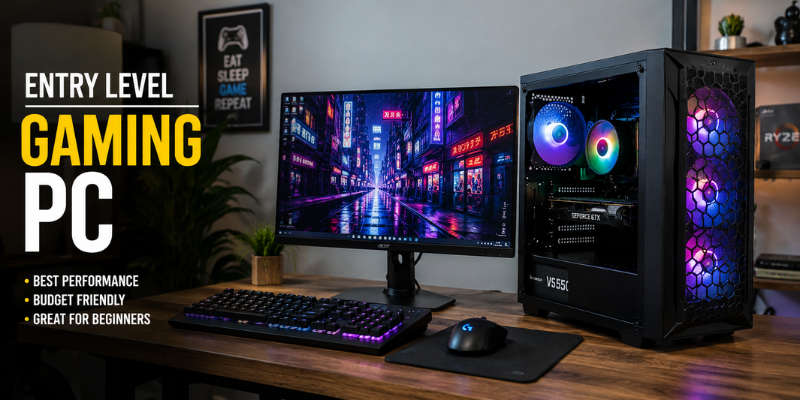
An entry level gaming PC is a budget-friendly desktop designed to play modern games at reasonable settings while offering room for future upgrades. Unlike basic office computers, gaming PCs include dedicated graphics cards, faster processors, and better cooling systems.
Most entry-level systems focus on delivering smooth gameplay at 1080p resolution. While they may not run every new release at ultra settings, they provide excellent value for new gamers.
Typical features include:
- Dedicated graphics card
- Modern multi-core processor
- 16GB RAM
- Fast SSD storage
- Upgrade-friendly motherboard
- Reliable power supply
For many players, this level of hardware is more than enough for several years.
Essential Components That Matter Most
Not every specification has the same impact on gaming performance. Understanding where your money goes helps you make a smarter purchase.
Graphics Card
The graphics card is the heart of any gaming computer. It determines frame rates, visual quality, and how well games perform.
Popular entry-level options include:
- NVIDIA GeForce RTX 3050
- NVIDIA GeForce RTX 4060
- AMD Radeon RX 6600
- AMD Radeon RX 7600
Even the most powerful processor cannot compensate for a weak graphics card during gaming.
Processor
A capable CPU ensures games load quickly and run smoothly.
Strong choices include:
- Intel Core i5
- AMD Ryzen 5
Both provide excellent performance for gaming, streaming, and everyday productivity.
Memory
Today, 16GB RAM is the sweet spot.
While 8GB can still run some games, many newer titles benefit significantly from having 16GB, especially when multitasking.
Storage
Solid-state drives have transformed gaming.
Compared to traditional hard drives, SSDs offer:
- Faster boot times
- Shorter loading screens
- Quicker game installations
- Better system responsiveness
A 1TB NVMe SSD provides plenty of room for Windows and several large games.
What Games Can an Entry Level Gaming PC Run?
One common misconception is that budget gaming PCs struggle with modern titles. In reality, many games perform surprisingly well.
Popular games that run comfortably include:
- Fortnite
- Valorant
- Counter-Strike 2
- Minecraft
- Apex Legends
- Rocket League
- League of Legends
- EA Sports FC
- Grand Theft Auto V
Many AAA games are also playable with medium or high graphics settings at 1080p.
For example, a friend recently upgraded from an older office PC to a budget gaming desktop featuring an RTX 4060 and Ryzen 5 processor. The difference was immediate. Games that barely reached 30 FPS previously now ran smoothly above 100 FPS, making multiplayer matches much more enjoyable.
Should You Buy Prebuilt or Build Your Own?
This is one of the biggest decisions for first-time buyers.
Buying a Prebuilt Gaming PC
Advantages include:
- Ready to use immediately
- Professional cable management
- Manufacturer warranty
- Less technical knowledge required
A prebuilt system is ideal for beginners who simply want to plug in and start gaming.
Building Your Own PC
Advantages include:
- Better value for money
- Complete control over components
- Easier future upgrades
- Valuable learning experience
Building your own computer isn’t as intimidating as it once was. Thousands of detailed tutorials are available online, making the process surprisingly approachable.
If you’re comfortable following instructions, building can be a rewarding weekend project.
How to Choose the Right Entry Level Gaming PC
Before purchasing, consider your long-term gaming goals.
Ask yourself:
- What games will I play most often?
- Will I upgrade later?
- Do I need Wi-Fi?
- How much storage do I need?
- Is RGB lighting important, or do I care more about performance?
A balanced configuration usually offers the best overall value.
Look for systems with:
- 16GB DDR4 or DDR5 RAM
- 1TB SSD
- RTX 4060 or RX 7600 graphics
- Intel Core i5 or Ryzen 5 processor
- 80 Plus certified power supply
Avoid spending your entire budget on appearance. Fancy RGB lighting looks attractive, but stronger hardware delivers a much better gaming experience.
Upgrade Potential Makes a Big Difference
One advantage of desktop gaming PCs is their flexibility.
Unlike many laptops, desktop components can usually be upgraded over time.
Future upgrades might include:
- More RAM
- Larger SSD
- Better graphics card
- Stronger processor
- Improved CPU cooler
- Additional case fans
Buying an upgrade-friendly system today can save hundreds of dollars in the future.
Many gamers gradually improve their systems over several years instead of replacing the entire computer.
Common Mistakes First-Time Buyers Make
Many beginners unknowingly overspend or buy the wrong hardware.
Avoid these common mistakes:
- Choosing only 8GB RAM
- Buying a computer with no dedicated graphics card
- Ignoring power supply quality
- Purchasing outdated processors
- Prioritizing RGB over performance
- Buying too little storage
- Forgetting future upgrade options
Reading reviews and comparing benchmarks before purchasing can prevent expensive regrets.
Is an Entry Level Gaming PC Worth It?
Absolutely.
For casual gamers, students, and newcomers to PC gaming, an entry level gaming PC provides outstanding value.
You don’t need the most expensive graphics card to enjoy gaming. Many players spend hundreds of hours playing esports titles that run beautifully on affordable hardware.
The best gaming experience comes from balancing performance, reliability, and future upgrade potential—not simply buying the most expensive machine available.
Frequently Asked Questions
Can an entry level gaming PC run AAA games?
Yes. Most entry-level gaming PCs can run modern AAA games at 1080p using medium or high settings. Performance depends on the graphics card and processor.
How much RAM should an entry level gaming PC have?
Sixteen gigabytes is currently the recommended amount. It provides smooth gameplay while allowing background applications to run comfortably.
Is building a gaming PC cheaper than buying one?
In many cases, yes. Building your own PC often provides better hardware for the same budget, although prebuilt systems offer convenience and warranty support.
How long will an entry level gaming PC last?
With quality components and occasional upgrades, an entry-level gaming PC can remain useful for five years or longer.
Can I upgrade my gaming PC later?
Yes. Most desktop gaming PCs allow upgrades such as adding more RAM, replacing the graphics card, installing additional storage, or upgrading the processor.
Conclusion
An entry level gaming PC is an excellent starting point for anyone entering the world of PC gaming. By focusing on balanced hardware, reliable components, and future upgrade options, you can enjoy smooth gameplay without overspending. Whether you buy a prebuilt system or build one yourself, making informed choices today will provide a better gaming experience for years to come.